Over the last year, Google search console has become one of the best tools for SEO’s to go to. Webmasters have been used to using Google’s old search console (Webmaster Tools) for many years, so what makes the new Google Search Console better? In this blog post, we explore what makes Google Search Console so invaluable for SEO’s and Webmasters.
How to get set up on Google Search Console
Google Search Console is free for anyone who has a website. The set up is easy and all you require is the following:
- A Google account
- Access to your website (via ftp or your favourite website editor)
- A little knowledge of html
To start off with, visit the Google Search Console and make sure you are signed in on your Google account. When you are logged in, you will see in the top left corner a button where you can ‘add a property’, this is where you add your website. With Google Search Console you can add multiple websites, which is very handy for when you need to manage multiple projects at one time. There are two easy ways to add your website to Search Console, including;
Uploading a verification file
Google will provide you with a unique file that is used to verify that you own the website you have submitted. Simply download this file and upload it to your /public_html/, once that is done, ask Google to verify the file and you are done.
Verify through Google Analytics
If you are already signed up and verified on Google Analytics, you can verify your website by using that. Ensure that you are using the correct email address that is associated with the Analytics account.
Once that is done, you are ready and will have access to all versions of the Google Search Console.
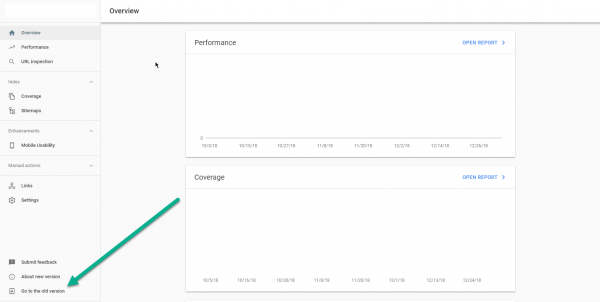
Before we go any further with this blog post, I should state that at the time of writing this, the new versions of the Search Console is still in development. Google are actively working on the new version but there are some features that are still useful on the old version. We expect that all of the features from the older version will eventually be available for the new version. We will cover some of those features, but for now, here are our favourite features of the new version.
- Impression Performance
- On the old search console you could easily track which keywords were appearing in the organic search rankings as well as track sessions from individual devices. You can do all of this in the new version but with how many impressions you have received. Increasing your impression rate is key for building your online visibility and can give you a good idea of how well your brand is performing. The more people who see your brand name and website the more rememberable the business becomes.
- URL Submission
- There is a url submission section on both new and old versions of the Search Console, however the url submission is a lot easier and nicer on the new version. For example, you will not be nagged by multiple recaptchas on the new version and you will be able to find out how well your url is performing which is mentioned on the next section.
- URL Error Recording
- When submitting a URL to the new google search console, the new system reviews the submitted URL and lets you know how well it is performing. It covers information like its index status and reports on any errors, for example, if you are blocking crawl access via robots.txt
- Better Index Coverage Reporting
- This is also a feature in both new and old versions however in the new version, the index coverage report is a lot more in depth. Offering webmasters the chance to find out any potential issues.
- Search Enhancements: Mobile Usability
- The mobile usability feature lets you know if your website template or content is not fully mobile optimised. Most of us are pretty nifty on mobile devices however there are people with disabilities or chubby thumbs who do not have pin point pixel accuracy – something we often forget about in development. Fortunately Search Console has your back and lets you know if your elements are a bit too close.
While the new version is pretty awesome, the old version is also just as good and has many features that the new one does not sport yet. If you would like to try out the older version, find the ‘go to the old version’ located in the bottom left of the Search Console (shown in the image above).
Here is a list of features that are really beneficial for webmasters in 2019;
- Disavow Tool
- A tool to only be used by the experienced. The Disavow tool allows webmasters to state to Google links that are of a spammy or negative nature.
- Security Details
- The security details section showcases to the webmaster if there is any malware of potentially harmful code on your website. Fortunately most people don’t get any messages from this section, if you ever do, be sure to act upon it quickly because your website may get blacklisted.
- Site map Submission
- An essential tool for every website. The site map submission tool enables the user to showcase to Google all of the websites most important pages. It is the quickest way to get your pages indexed – enabling them to compete on the organic search rankings as quickly as possible.
- Keyword Discovery
- We all have our target keywords, but have you ever wondered what other kind of keywords you are ranking and obtaining traffic from? Search Console lets you know these keywords and how much traffic you have got from them.
- Confirming Schema Markup
- Structured data is still an important part of SEO, helping websites get showcased in rich snippets as well as showcasing review data from inside the organic rankings. Listed under search appearance, Google’s crawlers provides you information on if you have your coding set up correctly for each Schema based category.
What we think
Here at Victory.Digital, we use Google Search Console a lot more these days. With the addition of impressions for search, we can obtain a greater understanding of how well our clients brands are doing. When you add traffic details on top of that, it makes for easy reporting. The new version of Google Search Console is great, we are looking forward for all of the features to be available as well as new ones that will help webmasters understand their website rankings going forward.